Sometimes due dates are not about urgency, and tasks do not have to be completed by a specific date.
A due date can be just information, not a deadline.
You may track appointments with a doctor and keep notes associated with the visits. You need to see the next visit’s due date and get notified about it. But it is annoying to see this date as overdue weeks after the visit - if you don’t want to mark the item as “completed” to keep associated sub-items/notes/attachments.
Or you may have project milestones with due dates. When the milestone passes, it can be archived or kept - still, you don’t want an urgent “overdue!” mark on it.
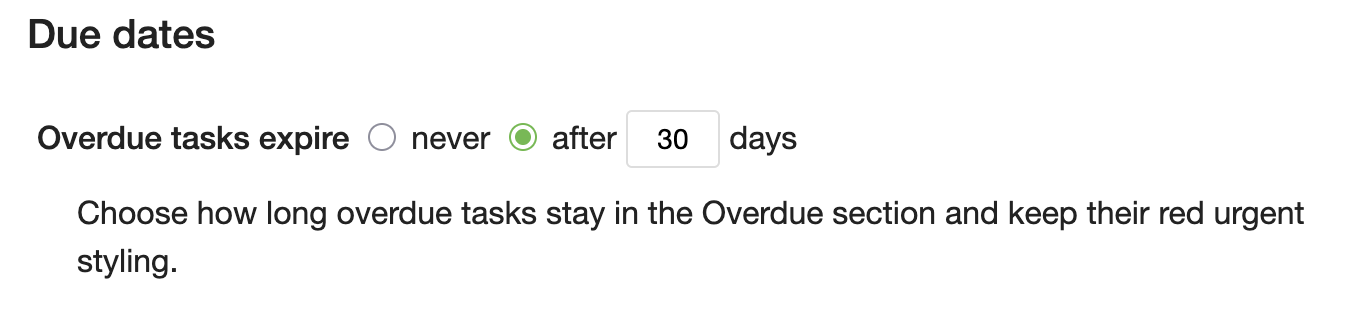
To support such scenarios, we now allow overdue tasks to expire. You can set the expiration threshold on the profile page. If a task stays overdue longer than the specified number of days, it is removed from the “Overdue” section of the due page, and is no longer shown in the red overdue style. Expired overdue tasks are also excluded from the daily due email notifications.
You can still see expired overdue tasks in the separate Expired section on the due page, or search for them with the due:expired search syntax.
Another small addition in this release is the nw keyboard shortcut to move a task’s due date to the next week (+7 days).
I would like to thank @zinoff and @ryanscampbell for contributing these ideas.
Hope it is useful to other people, too. For us - definitely 
As usual, we’ll be glad to hear your thoughts and suggestions.
Onwards 