Double line-through

Hi,

All my completed headings now have a double line-through. I messed with custom CSS (to be honest I can’t even remember what I was trying to do :sweat_smile:). But now, even with no custom CSS at all I’m getting this:

image

I wish I could be of more help with how to replicate it.

Ed

Hello @Eduardo,

It is OK, custom CSS is not a trivial thing :slight_smile:

I’d say that one of the ways to figure out what’s going on is to remove custom CSS entirely (save it somewhere outside Checkvist settings), and then start adding blocks one by one to see if everything is OK.

You can also post your CSS here, as a code block - we’ll try to take a look.

Best,
KIR

1 Like

The issue here is that I had absolutely no custom CSS when I took that screenshot.

Currently this is all I have in the custom CSS setting:

@import url(ā€˜https://fonts.googleapis.com/css2?family=JetBrains+Mono’);

* {
  font-family: ā€œJetBrains Monoā€;
}

And this is what I see in completed headings:

image

Strange, right? :sweat_smile:

Ed

Strange, agree. Will investigate, given that we promote this syntax ourselves.

Stay tuned.

1 Like

Thanks for looking into it! :slight_smile:

Ed

Try this variant:

@import url('https://fonts.googleapis.com/css2?family=JetBrains+Mono');

.main_div {
  font-family: "JetBrains Mono", monospace;
}

Basically, I’ve added monospace as a fallback. I do not know why, but this variant looks to work.
Please check.

1 Like

Hi Kir,

I think we may have lost each other in this conversation. I don’t have an issue getting JetBrains Mono to work at all. My problem is with the double line-through when I complete any text that is a heading. So for example, if I use the custom CSS example you guys provide to remove the line-through on completed objects, I still get one line-through on those. It just seems like something broke on my account :joy:

Am I making any sense? :joy::joy:

Ed

1 Like

Right :))) Please check https://beta.checkvist.com - it should be fixed there :slight_smile:
And thanks a lot for pointing out - it was a mistake on our side, we literally had a strike-through with 2 rules. Now only one is used.

Best,

1 Like

Ah great stuff!

Thanks for taking the time to look into this. I think a new bug as appeared though :joy:

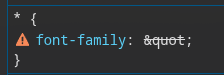
It looks like the custom CSS thingy is taking special characters unescaped (I think).

Basically, if I use:

* {
  font-family: "JetBrains Mono";
}

it’s capturing this:

image

:grimacing::joy:

Ed

Try using quotes from your previous post, they work :slight_smile:

1 Like

If I do, it doesn’t recognise the font and just uses a default serif font :joy:

Oh, right. Embarrassing. But this should be fixed on beta, too :smiling_face_with_sunglasses::nerd_face:

1 Like

Awesome!! I can confirm all is working fine now. Thanks! :slight_smile:

1 Like